Customer matching logic
This is the Customer matching logic that myKaarma backend follows to make sure we do not create duplicates while saving customers. The same logic runs when you:
- Save a customer with
searchForDuplicateset totrue. If a customer matches, that customer is updated; otherwise a new customer is created. - Call the match customer API (
POST /customer/v2/department/{departmentUuid}/customer/match). If a customer matches, that customer is returned; otherwise the response is empty.
Matching only looks at customers of the dealer that the department belongs to.
Logic
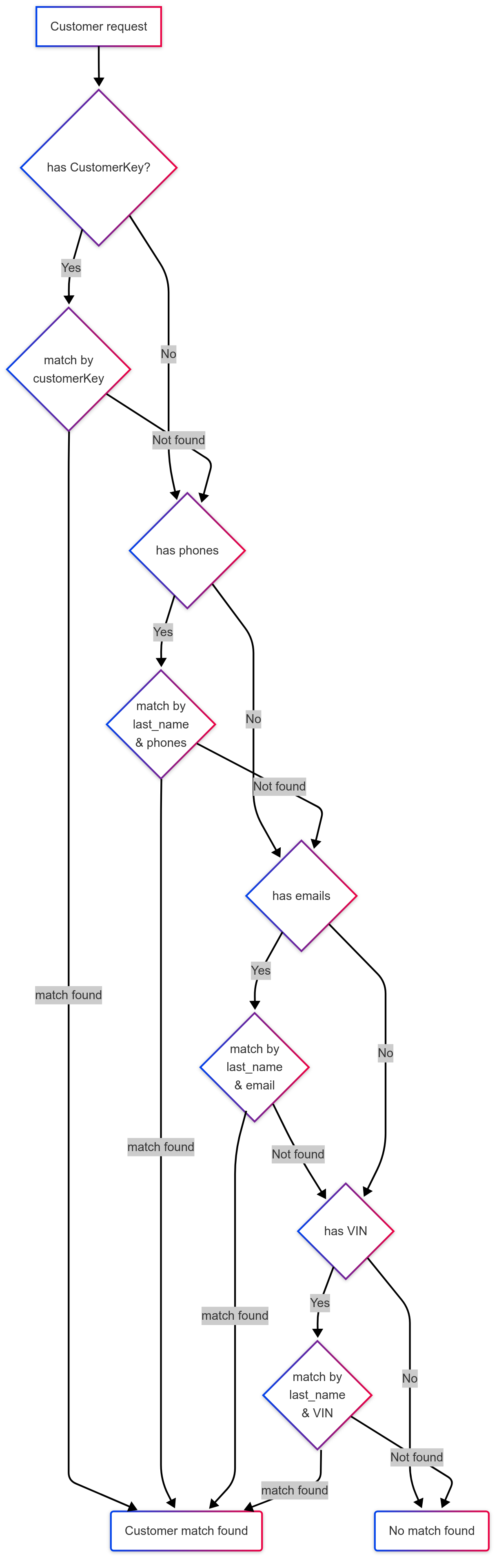
Detailed explanations for selected steps in the workflow
Check the input:
The system reads the phone numbers, emails, VINs, customerKey, first name and last name from the request. Phone numbers are normalized before matching. Matching only runs if the request has:
- at least one phone number or email, and a first name or a last name, or
- at least one VIN, and both a first name and a last name.
Otherwise no customer is matched.
Find customers list by communications and VINs:
In this step, the system retrieves a list of customers by matching the provided phone numbers and emails. Similarly, it retrieves a list of customers by matching the provided VINs. The two lists are merged into a single list without duplicates. If the list is empty, no customer is matched.
Match by input customerKey:
This step only runs if the request has a customerKey. If a customer in the list has the same customerKey (ignoring case and surrounding spaces), that customer is returned immediately. If no customer has the same customerKey, all customers that have a customerKey are removed from the list, because they belong to a different DMS customer.
Find matching customer by input name:
In this step, the system keeps only the customers whose name matches the input name. Names match when:
- the first names and the last names are the same, ignoring case and middle names;
- one side is a single name that equals the other side's first name or last name (for example, "David" matches "David Hara", and "Hara" matches "David Hara");
- one side is an initial of the other (for example, "D Hara" matches "David Hara").
A customer named "Unknown Number" matches any name.
If no customers remain, no customer is matched. If exactly one customer remains, that customer is returned. Otherwise, the system proceeds to the next steps.
Prefer customers by customerKey:
In this step, the system prefers customers that have a customerKey. If the request sets preferNullCustomerKeys to true and has no customerKey, it prefers customers that do not have a customerKey instead. If exactly one customer is preferred, that customer is returned. If no customer is preferred, the next steps use all customers that matched by name.
Close match by communications and VINs:
In this step, the system looks for the customers that best match the input phone numbers, emails and VINs. It keeps the customers that match both a phone number or email and a VIN. If there are none, it keeps the customers that match a phone number or email. If there are none, it keeps the customers that match a VIN. If exactly one customer is kept, that customer is returned.
Pick the most recently updated customer:
If the close match did not find exactly one customer, the system returns the most recently updated customer among the preferred customers. If no customer was preferred, it uses all customers that matched by name.